
Logo of the Nuclex Framework, the text "Nuclex" with three green dots on a blue ring

New Component: Nuclex.Input

The word 'Nuclex' in a stylish font framed by an elliptical ring with three dots

Developers following my twitter feed may already know that in the past few days, I’ve been working on a new component for the Nuclex Framework: Nuclex.Input. This component aims to solve all problems I ever had with input devices in XNA :)

It’s a very simple library that provides input device classes similar to the ones in XNA (Keyboard, Mouse, GamePad), but instead of 4 game pads, there are 8 (with indexes 5-8 for DirectInput-based controllers). All input devices provide events (like KeyPressed and CharacterEntered on the keyboard or MouseWheelRotated on the mouse, for example). Here’s a quick run down of the features:

  • Well-behaving keyboard text input

    • Honors keyboard layout and system locale
    • Supports XBox 360 chat pads
    • Very easy to use: just subscribe to an event
  • Support for standard PC game controllers

    • Works with any DirectInput-compatible controller
  • Mouse movement with sub-pixel accuracy (postponed)

    • Finally put those expensive high-dpi mice to use ;-)
  • Allows event-based input handling

    • Fully type-safe: events instead of message objects
    • Only compares states if events have subscribers
    • Mouse and keyboard don’t have to compare states at all
  • Zero garbage: doesn’t feed the garbage collector

    • During usage, the library produces zero garbage

Curious? Click on “Read More” to view some code samples!

Download

This component will be in the next release of the Nuclex Framework!
If you want it now: Nightly builds, Source code (svn)
Read More

My Screen works Again :-)

Last Friday (and I only now notice it was Friday the 13th :D) my screen stopped working. I dismantled it and found some bad capacitors, then decided to do a small foto story showing my attempt to get it working again: My Screen went Dark :-(.

Today the electronics components I ordered arrived and I could finally replace those capacitors I found to be broken last time.

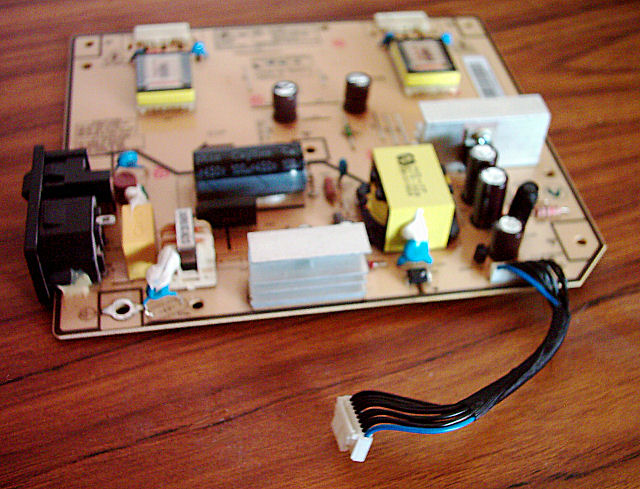
Picture of the top side of my 204B's power supply board with the new capacitors in place

Soldering in the new capacitors was surprisingly easy. I remember that when I did this in my childhood, I spread solder everywhere except where I wanted it to ;)

Read More

Quo Vadis, Input System?

I’ve spent some time thinking about how input is handled by my GUI library. One issue I didn’t cover in its initial design is that people might want to use the GUI library at the same time as their game is running (think of a command palette in a strategy game). I’ve already got some requests on the CodePlex forums (How to determine if a screen-position (i.e. mouseclick) is on any gui-control ? and Unfocusing from GUI) and it’s about time I did something about this.

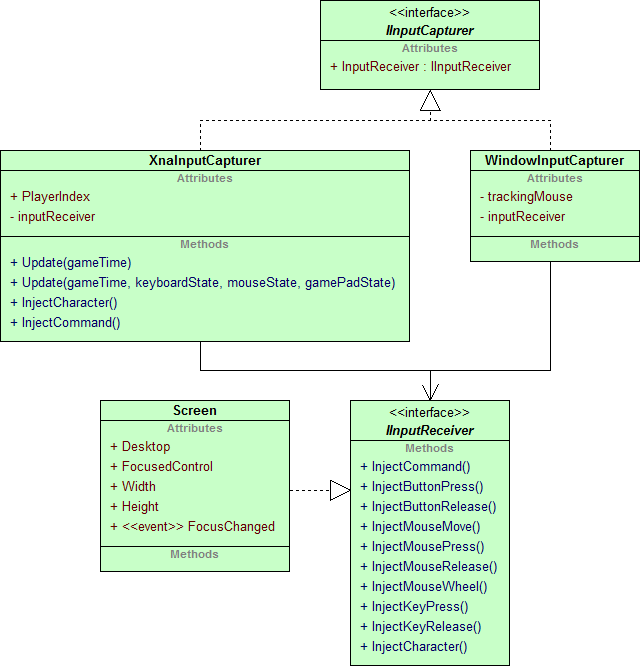
In the old design, an IInputReceiver was fed by one of two classes: one was the XnaInputCapturer which relied completely on XNA’s input device classes (Keyboard, Mouse, GamePad) to track the status of any input devices, the other was the WindowInputCapturer which intercepted incoming window message for XNA’s main window to obtain the status of input devices:

UML diagram showing the input system with two distinct classes for XBox and Windows input

This wasn’t even nearly an ideal solution because now I would have to copy & paste the game pad polling code from the XnaInputCapturer to the WindowInputCapturer if I wanted game pad input on Windows. The new design should fix this, but still follow the concept of routing all input through a single interface (IInputReceiver) to allow users to easily attach the GUI to their own input handling code.

Read More

My Screen went Dark :-(

Earlier this year, one of my monitors started behaving strangely each time it was turned on the first time for the day. The image would flicker on and off, first very slow, maybe twice a second, then faster and faster still until it displayed a permanent and stable image.

Over time, things got worse. First it would take just a few seconds, then two months later, the screen would stay black for minutes before the now familiar flickering started and the display settled. This morning, the display just remained black.

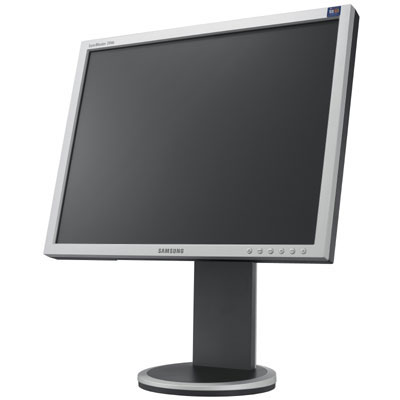
Picture of a Samsung SyncMaster 204B TFT LCD display

Some googling revealed the likely cause: bad capacitors. Between 1999 and 2007, many electronic parts were sold with bad capacitors because, at least that’s a popular story, one Taiwanese company had obtained the knowledge to build electrolytic capacitors via espionage, but the informations were incomplete and the electrolyte was missing and certain agent that prevented the hydrogen from escaping.

Whatever the reason, my TFT’s production date falls into the problematic range and symptoms are similar to things other people reported. So I went ahead and tried to take a look at the thing, documenting each step with my camera.

Read More

To GameComponent or not to GameComponent

XNA provides a neat little system for you to organize your game’s different parts in: GameComponents. You can use them to modularize your game’s subsystems, eg. have a GuiComponent, PhysicsComponent, SceneGraphComponent etc. so you avoid having all that code in your Game class, or can use them for your actual game objects in smaller games.

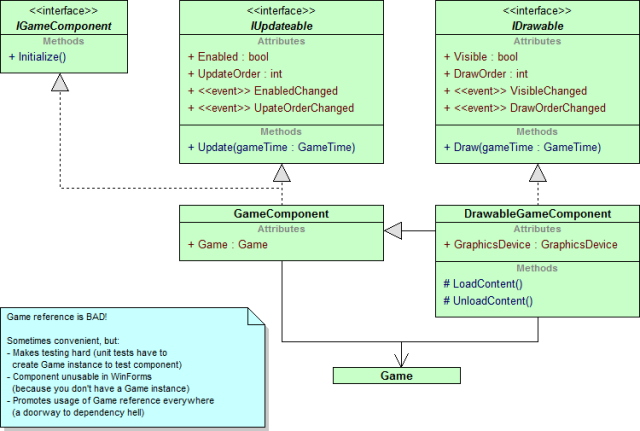
However, the GameComponent and DrawableGameComponent classes provided by XNA force you to reference the Game class. This is unfortunate if you want to use those components in a WinForms-based XNA application and gets in the way when you try to write unit tests for your components because now you have to create a dummy Game instance as well (and better hope that component won’t go shopping for references in the Game‘s Components and Services collections as well).

UML class diagram of the GameComponent and DrawableGameComponent classes

Luckily, the GameComponentCollection used by XNA to store your components manages IGameComponents and updating/drawing are based on the IUpdateable and IDrawable interfaces alone, so there’s nothing preventing you from rolling your own components without referencing the Game class.

Read More

Using Ninject with SunBurn

First, let me say sorry if I seemed to be absent for the past months. I was quite burned out and didn’t want to do much with computers during that time :).

My “XNA Game Architecture” series was left hanging, and right when it got interesting, too. I’ll try to find the time to continue where I left off. For now, here’s a small appetizer:

The letter N constructed from overlapping blue wave functions

Some weeks ago, Synapse Gaming offered their SunBurn Lighting and Rendering Engine for half the price. This was too good an offer to pass and so I now find myself being able to do much better lighting effects than I had ever hoped to achieve in my game.

The first thing I did was, of course, to adapt SunBurn to Ninject, a very tidy dependency injector that works on the XBox 360 and even on Windows Phone 7, into the SunBurn example application. This article gives a short overview about the overall structure and provides you with an example application if you want to give Ninject a try yourself.

Read More